
Cloud PBX Statistics Instead of a Supervisor: Saving $12,000 a Year on Hiring
In a small city, a shuttle transportation company serves 40 routes. Five dispatchers handle more than a thousand calls a day. Passengers call directly from bus stops and expect an immediate answer to the question: Where is my bus?.
For a long time, David thought the dispatch team was doing just fine: calls were answered, and transportation services were provided. Then customer complaints started appearing on Google Maps and Facebook, and employees began leaving the team. It was not clear what caused the problem: too few people, uneven workload distribution, or performance issues with specific dispatchers.
The Numbers Revealed the Scale of the Overload
When an employee didn't come to work, David had to step in as a dispatcher to keep services running. He answered 220 calls in one day, which is a very heavy workload for one person.
Cloud PBX statistics helped him understand the scale of the problem across the whole dispatch team. In the Call Count Report, the owner saw that the company received 1,345 calls in one day. Four dispatchers and David answered 1,170 of them. Another 175 calls (about 13%) were missed.
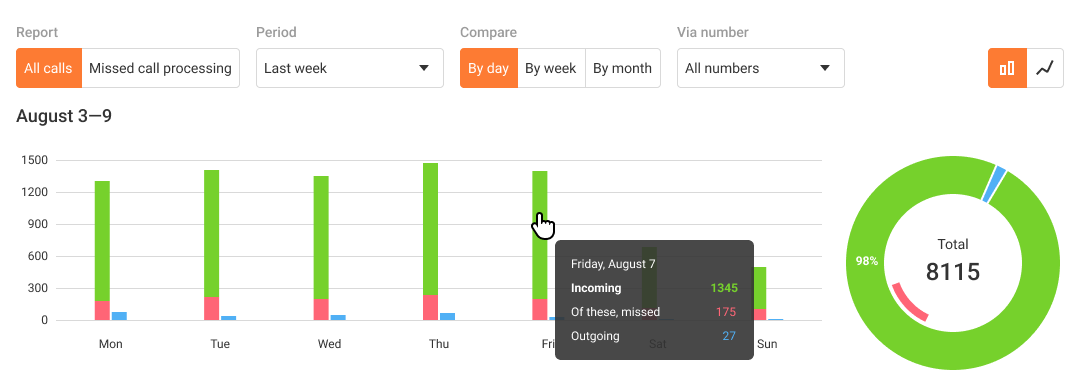
David checked several missed calls and saw that when a passenger tried to get through, all dispatchers were already talking to other customers. It became clear the issue wasn’t with individual employees: the entire team simply couldn't handle the influx of inquiries.
“When you spend several days on the phone and do nothing else, you have no time left for anything. In the moment, you can’t even estimate how many calls you handle in a day. But when you open the statistics and see the numbers, you understand that the dispatchers are really working at their limit,” David says.
For two days, he answered more than 200 calls a day himself. That was enough for him to switch from passively searching for employees to active hiring: he calculated the required team size and contacted a recruiting agency. David also considered hiring a dedicated dispatch supervisor, but as the average salary for this position was high, he decided to see first whether he could manage the team on his own using Cloud PBX statistics.
How to Understand Who Is Working at Their Limit
The total number of calls alone doesn’t show a specific dispatcher's workload or performance level. That is why David compares employees’ metrics: how many calls each one handles, their share in total incoming calls, and their workload.
If an employee's metrics differ noticeably from the average or change from their usual level, it is a reason to look for the cause. David found that more than 150 calls a day is a sign to redistribute some part of the work.
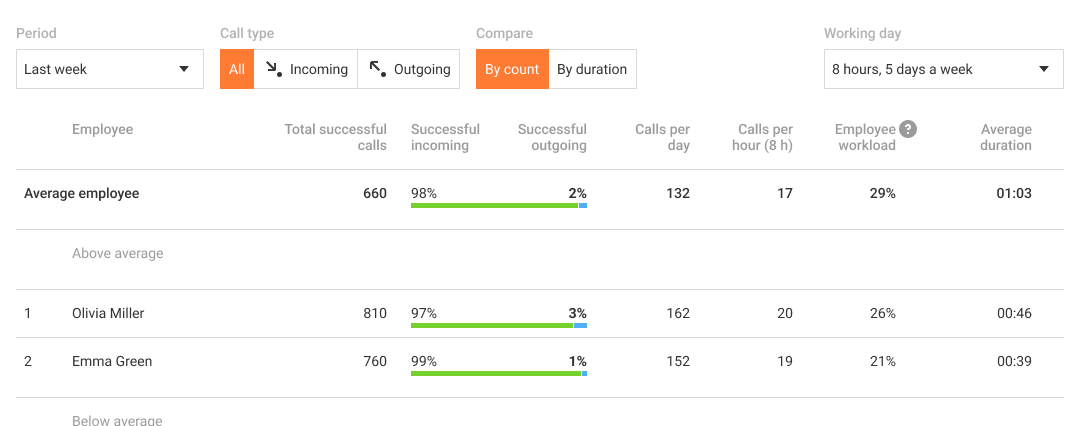
“You can’t understand how busy an employee is from the quantity of calls alone. That is why we look at several metrics at once: how many calls the employee handles, what their workload is, and how long the average conversation lasts. This makes it clear whether the dispatcher is really overloaded and, most importantly, how they are handling the workload,” David explains.
By looking at these metrics together in Employee Rating, David can see who needs support or coaching before the problem leads to resignation.
Long Calls Are a Reason to Take a Closer Look
Another quality metric is call duration. One long conversation is not enough to draw conclusions about a dispatcher's work. But if their call duration is regularly higher than the dispatch team's average (for example, the employee usually spends 3-4 minutes on questions that colleagues resolve in 30-60 seconds), David pays attention. This is especially important for a new specialist.
To understand the reason behind this metric, David reviews the call history and listens to specific long conversations. This helps him find out whether the employee lacks knowledge, spends too much time searching for information, or has difficulty following the workflow.
“If a new dispatcher takes too long to answer simple questions, it signals to me that they need more coaching. It means the employee does not yet know where to quickly find the necessary information about routes, schedules, or the workflow. In this case, we review calls with the employee, assign them a coach, and update the knowledge base used by the dispatch team,” David says.
Average call duration in Rating helps identify deviations, and the history and recordings of specific conversations help find the cause. This way, David can spot coaching gaps in time and help new employees start working independently faster.
Call Peaks as a Planning Tool
Hiring new employees was not enough. David also needed to understand how to distribute them throughout the day. If the same number of dispatchers work the line for the whole shift, there may not be enough of them during peak hours, while in periods with fewer calls, part of the team will be idle.
To understand when the department needs more employees, David checks the Hourly workload report. Data for the last month is enough for him to see which hours have the most requests. For David, the hours from 6:00 to 9:00 are especially important because this is when people most often leave for work. And after 19:00, the number of calls decreases noticeably.
Based on this data, David plans shifts: during peak hours, he assigns more experienced dispatchers to the line, and he brings in new employees during periods with fewer calls.
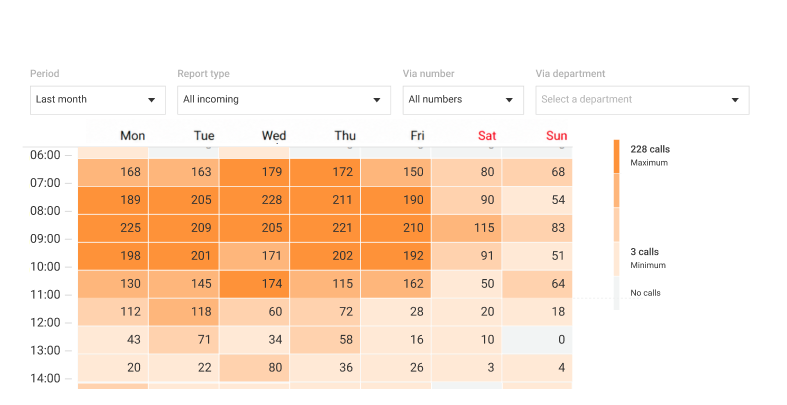
“I really liked how the report shows hourly workload. It made me think: why not create similar charts to see vehicle usage? Then we could understand when vehicles are in highest demand, and plan drivers' work around that,” David says.
With this report, the owner can distribute employees based on the actual workload and strengthen the team in advance during peak hours.
From Overload to Managed Workload
After David hired new dispatchers, the share of missed calls dropped from 13% to 4%. The workload per employee became reasonable: dispatchers now have time to handle incoming calls, return missed calls, and even help new team members.
David did not have to hire a dedicated dispatch manager. Once a week, he opens Cloud PBX statistics himself, checks key metrics, and quickly notices changes, such as an increase in missed calls or seasonal peaks. This way, he manages the dispatch team's work on his own and optimizes management costs. With the average salary for a dispatch manager in the area at more than $1,000 a month, David saves about $12,000 a year.
Do you want to manage your team's workload yourself in the same way? Start with three simple steps:
- once a week, compare employee metrics: number of calls, workload, and average conversation duration;
- determine the acceptable workload based on experienced employees who handle their work consistently, and use it as a benchmark;
- check deviations and decide what needs changing in the workflow: adjust the schedule, redistribute calls, or update employee knowledge.
To check how workload is distributed in your team, open statistics and call history in your Cloud PBX.